Powered by Blogger.
RSS

How To Add Facebook Like/Fan Box To Blogger


A Facebook Fan Box or Like Box is a great plugin that allows blog visitors to subscribe to your blog updates via their Facebook accounts, without leaving your blog. After subscribing (by pressing like button) , visitors will receive your most recent blog updates on their Facebook page. This box also displays faces of the "likers" on your blog. Before creating a fan box you should already have a facebook fan page. If you haven't yet created, click here to learn how to create a facebook fan page.


Add Facebook Like Box to Blogger


1. Find out your Facebook fan page URL by visiting your Facebook fan page and copy the url in the address bar, you can see how your url should look like in my screenshot:

2. Then visit this page: http://developers.facebook.com/docs/reference/plugins/like-box

3. Paste your url into the Facebook Page URL field as it is shown below:

4. Once you are satisfied with the looks of the Like Box, click on the "Get Code" button

5. You'll be given two codes, titled HTML 5, XFBML and IFRAME. You only need theiframe code. 
Select it and copy the code generated for your box as it is shown in the example below:

6. Then go to your Blogger Dashboard >> Design >> Page Elements >> click on the Add a Gadget link >> select HTML/JavaScript and paste the code in the HTML box.
thats done 

  • Digg
  • Del.icio.us
  • StumbleUpon
  • Reddit
  • RSS

How to add flying twitter bird to blogger


Today I am going to show you another amazing blogger trick. That is flying twitter bird. This simple twitter bird can boost your traffic instantly. So isn’t it amazing?? Twitter is an excellent platform to share your links and drag more visitors to your blog. Millions of people use twitter and this flying twitter bird. 

To be frank this is not just a flying bird. Once a reader moves over this twitter bird it gives them two options. One is to tweet your post to twitter and other is to follow you in twitter. Both are important for web masters to increase their traffic. Other important feature of this bird is it will fly down when you scroll down. Then the reader will see this gadget all the times.

This gadget is Updated on 27/10/2012 to work with both old and new blogger interface
(Please click the appropriate links in blue color if you don’t know the meanings of specific words such as Dashboard, Design and etc.)

This is the screen shot of this amazing gadget.
You can see a LIVE DEMO HERE

Now let me explain the process to add this Flying twitter bird,

1.    First go to your DASHBOARD >> DESIGN >> EDIT HTML

2.    Then press CTRL+F on your key board and search for following code

</body>

3.      Then copy the following code and paste it below the </body> code

<!-- Twitter Bird start Techblaster.net --> <script src='http://yourjavascript.com/1523826141/Flying twitter bird.js' type='text/javascript'>
</script> <script type='text/javascript'> var twitterAccount = "Add your Twitter name here"; var tweetThisText = " <data:blog.pageTitle/>: <data:blog.url/> "; tripleflapInit(); </script> <span style='font-size:11px;position:absolute;'/><a href='http://www.techblaster.net' target='_blank'>Twitter Bird Gadget</a> <!-- Twitter Bird end Techblaster.net --> 

4.  Now replace the sentence “Add your Twitter name herewith your twitter name. 

5.    Then click on SAVE TEMPLATE at the bottom of your page

Well it is over. Now view your blog and see how nice this bird is flying all around your blog. If you have any problems feel free to post it in comment BOX

  • Digg
  • Del.icio.us
  • StumbleUpon
  • Reddit
  • RSS

how to add widgets/gadgets to blogger

Now frndss lets move 2 the first step

 how to add widgets/gadgets to blogger

login into ur dashboard if u want 2 add ur own javascript widget
layout>>add a gadget>>(press ctrl+F and then write HTML/Javascript)
it will appear like this <>click on it and in contents:paste ur own javascript and give it a Title and click on save U have done add much gadgets as u want
here a some sites for free widgets for blogger

http://flashvortex.com/
allblogtools.com
pageplugins.com

and many more 
visit allworldsofdownloads.blogspot.in
my first blog and u all can ask for any blogger Help
Repot in comment box & leave u email also(if u want)

  • Digg
  • Del.icio.us
  • StumbleUpon
  • Reddit
  • RSS

android apk apps


Amazing Magic Candle

Become the king of magic tricks with this amazing magic candle.
Just blow on it, touch it, to turn it off and impress all your friends as well.
Two way to light the candle :
* Simply, you can touch it
* Shake your phone

  • Digg
  • Del.icio.us
  • StumbleUpon
  • Reddit
  • RSS

Words Cheat


Words With Friends, Scrabble, Wordfeud Cheat:
Guaranteed win every single time
FREE Cheat for Words With Friends, WordFeud, EA Scrabble or any scrabble type game, use this app to gain an advantage over your opponents.
you may now also click on a word to add it to the notification bar and to overlay it ontop of your game. this allows you to play and see the spelling of the word you have chosen without having to go back and forth between your game and words cheat.
INSTRUCTIONS:
To use all you need to do is:
-enter the letters you receive from Words with Friends into the 1st text box.
-enter any words or letters you find already on the board that you would like to build your word off, into the 2nd text box.
-you can specify the placement of these board letters in relation to your word with the radio buttons ‘start’ ‘end’ and ‘any’. check the screen shots for examples.
-then just hit GO! It will provide you with a list of available words you can make, with the letters you have provided.
To see your game underneath wordsCheat:
please try these steps:
-open wordscheat, hit menu then settings.
-make sure “WordsCheat notification” is ticked.
-open or switch to Words With friends.
-select a board to play (make sure you are in a game where you can actually place tiles down.)
-once loaded, drag down your notifications bar and select wordscheat.
-this should overlay it !
-You can now go ad-free by hitting the menu button.
-New overlay feature, do not have to leave game.
-Does not rely on an internet connection.
-Fully functional, no restrictions.
-TURN ON/OFF FEATURES FROM SETTINGS SCREEN
-Make sure you check out the search settings before using
-Long press a word to access dictionary
-optional transparency see game board through app!
-multiple search settings (check settings screen)
-To use blank tiles just substitute with a question mark ‘?’

  • Digg
  • Del.icio.us
  • StumbleUpon
  • Reddit
  • RSS

ROOT UNINSTALLER PRO V3.1 APK


Very fast and simple uninstaller tool !


Root Uninstaller Pro play.google.com.rootuninstaller.pro
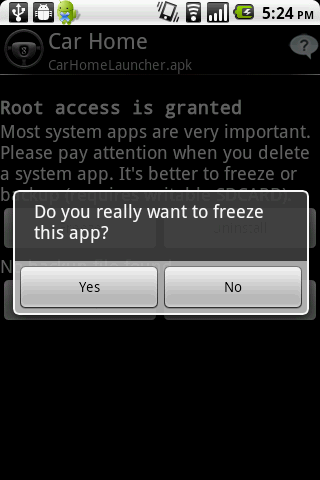
Don't like stock or system applications? It's for you. This application can freeze pre-installed applications on your phone and more.
Very fast and simple uninstaller tool on single click for uninstalling both SYSTEM and REGULAR applications.

NEW: Hide app mode: Launch a frozen app and automatically re-freeze on app closing (Pro only) 

For ROOT+NAND unlocked devices:
  • Uninstall system applications
  • Freeze or disable bloatware, stock and regular applications (keep updates)
  • Defrost or enable applications (Free trial or PRO)
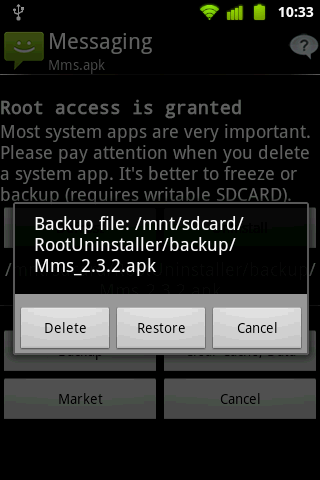
  • Backup system application .apk to sdcard (that can reinstall later)
  • Restore backed up applications
  • Reset applications to fresh install state
  • Delete definitively system applications
  • Hide my App: launch a frozen app and automatically re-freeze on app closing (Pro only, tap on Launch->Freeze button )

For NON-ROOT devices:
  • Quick APK list to show all available .APK files on SDCard
  • Keep Market reference and can restore after factory reset/change devices
  • Manage to clear data, cache (manually)
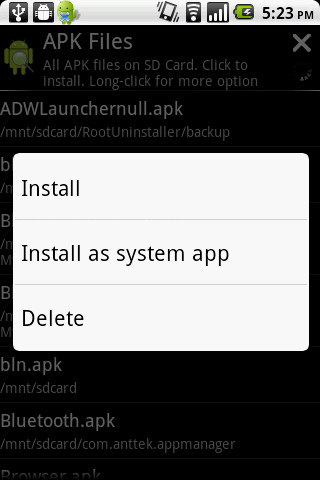
  • Manage .apk files: delete, install, install as a system app (PRO)
  • Single click to uninstall a listed applications (Batch uninstall).
  • Rapid load application list
  • Display application name, icon, package name
  • Exclude system applications (that you can not uninstall)
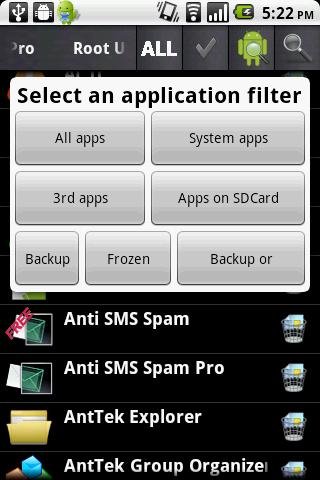
  • Filter by third-party applications, system applications, applications on sdcard. backup applications or frozenapplications
  • Support large screen (ex. tablet) views
What's in this version: (Updated : Dec 7, 2012)
  • Support Jelly Bean 4.2
  • Holo theme everywhere
Required Android O/S : 2.0.1+

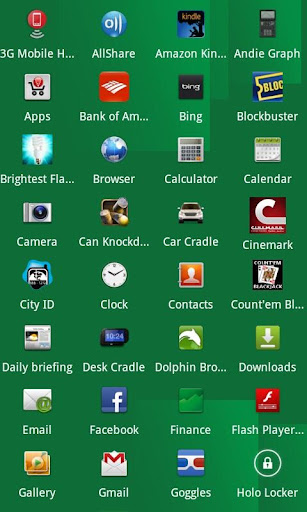
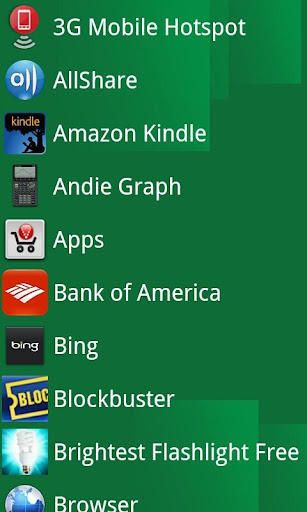
Screenshots :


Download : 850Kb APK
http://adf.ly/FhKwp

  • Digg
  • Del.icio.us
  • StumbleUpon
  • Reddit
  • RSS

WINDOWS 8 FOR ANDROID V1.5 APK


Make your phone run like a new computer with this amazing themed launcher!


Windows 8 for Android play.google.com.desktop8
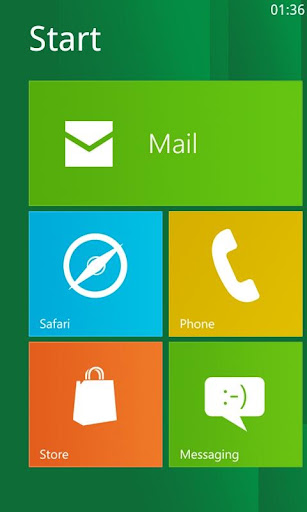
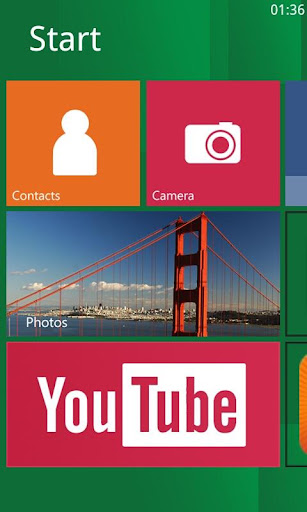
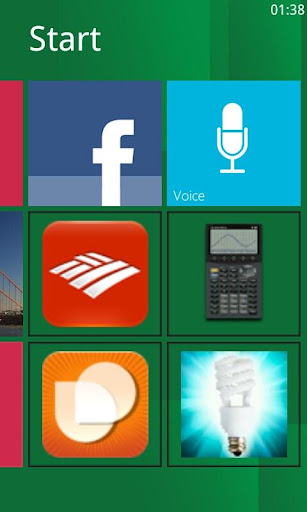
Get ready for an entirely new experience on your phone! This launcher allows your phone to emulate a windows 8 pc on your Android device. You can replace this home application with the default one and access everything on your phone through Windows 8 for Android. 

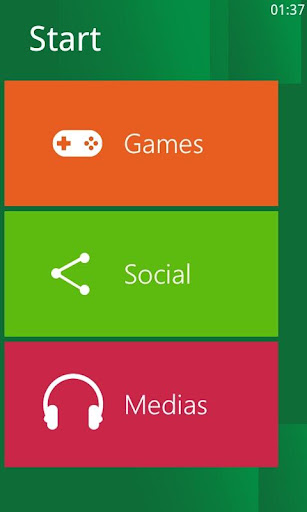
You can add tiles with your favorite applications on the home screen as well as your most used apps like the browser, phone, mail, and messaging. There are also folders so that you can add your favorite games, social, and media apps.

Enjoy Windows 8 for Android and for suggestions or questions please email me.

What's in this version : (Updated : Nov 25, 2012)
Required Android O/S : 1.2+

Screenshots :


Download : 2.3Mb APK
http://adf.ly/FUXoI

  • Digg
  • Del.icio.us
  • StumbleUpon
  • Reddit
  • RSS

VMware Workstation 8.0.4 Build 744019 Full Version Free Download


VMware Workstation 8.0.4 Build 744019 Full Version Free Download


VMware Workstation 8.0.4 Build 744019Winner of more than 50 industry awards,VMwareWorkstation is recognized for its broad operating system support, rich user experience, comprehensive feature set, and high performance.
It’s the perfect companion for any technical professional that wants to save significant time with a tool that is backed by world-class support.
Put the Cloud in Your PC
Run a full web or cloud environment on your PC, including VMware Micro Cloud Foundry. Run as a server to share virtual machines with your team, department, or anyone in your organization. Remotely connect to virtual machines running on VMware vSphere. Simply drag and drop to move virtual machines to a VMware vSphere server. Run, share, connect, or move virtual machines,its a whole new way to work.
Take Your Productivity to the Next Level
Run applications in Linux, Windows, and more at the same time on the same PC with no rebooting. Evaluate and test new operating systems, applications and patches in an isolated environment. Demonstrate complex software applications on a single laptop in a repeatable, reliable manner. Rich integration with Visual Studio, Eclipse, and the SpringSource Tool Suite make it incredibly easy to test applications on multiple platforms.
Run Your Most Demanding Applications
Create virtual machines with up to 8 virtual processors or 8 virtual cores, 2 TB virtual disks and up to 64 GB of memory per virtual machine to run the most demanding applications. Protect your virtual machines from prying eyes with 256-bit AES encryption and smart cardauthentication.
Image Hosted by ImageTitan.com Image Hosted by ImageTitan.com Image Hosted by ImageTitan.com Image Hosted by ImageTitan.com
Best 3D Graphics Just Got Better
VMware Workstation was the first to support 3D graphics in virtualized environments and wasthe first to support Windows Aero in Windows Vista and Windows 7 virtual machines. Run even more 3D applications with support for DirectX 9.0c Shader Model 3 and OpenGL 2.13D graphics in Windows virtual machines.
Award-Winning
Backed by over a decade of proven engineering, VMware Workstation is trusted by users worldwide. VMware Workstation is the winner of over 50 awards including the 2010 Redmond Magazine Readers Choice Award and the 2011 Dr. Dobb’s 2011 Jolt Product Excellence Award, and has been inducted into the Jolt Hall of Fame.
Run Multi-tiered Applications on a Single PC
Manage multiple, network-connected virtual machines with Folders. Folders make it easy to start and run complex multi-tier enterprise applications on a single PC with just a click of the mouse.
Snapshots and Clones: The Ultimate Time Saver
Snapshots preserve the state of a virtual machine so you can return to it at any time. Snapshots are useful when you need to revert your virtual machine to a prior, stable system state. Workstation makes it easy to find and revert to a previously saved snapshot.
Installing operating systems and applications can be time consuming. With clones, you can make many copies of a virtual machine from the baseline installation and configuration. This makes it fast and simple to maintain standardized computing environments for employees andstudents, or to create a baseline configuration for testing.
Recycle Old Hardware
Quickly and easily convert all those Microsoft Windows and Linux-based physical PCs sitting under or around your desk into VMware Workstation virtual machines. Get all the benefits of virtualization while freeing up desk space and hardware.
Protect from Prying Eyes
Protect your virtual machines from prying eyes with 256-bit AES encryption.
Printing that Just Works
Driver-less printing makes your PC printers automatically accessible to your Windows and Linux VMs—no configuration or drivers required. Your PC’s default printer even shows up as the default, too.
Go Back in Time
Buggy applications, hardware failures, viruses and other malware do not give you fair warning to take a manual snapshot. AutoProtect luckily automatically takes snapshots at set intervals, protecting you from unexpected bumps in the road, making it easy to go back in time to when things were good.
Free Up System Resources
Pause a virtual machine to free up CPU resources for use by other running virtual machines or demanding applications.

LetitBit | RapidGator | TurboBit |

  • Digg
  • Del.icio.us
  • StumbleUpon
  • Reddit
  • RSS
Twitter Bird Gadget